


'%3e%3cline%20id='直线_13422'%20data-name='直线%2013422'%20x2='29.367'%20transform='translate(23668.262%20-12026.238)%20rotate(45)'%20fill='none'%20stroke='%23000'%20stroke-linecap='round'%20stroke-width='2'/%3e%3cline%20id='直线_13423'%20data-name='直线%2013423'%20x2='29.367'%20transform='translate(23689.027%20-12026.238)%20rotate(135)'%20fill='none'%20stroke='%23000'%20stroke-linecap='round'%20stroke-width='2'/%3e%3c/g%3e%3c/svg%3e)

'%3e%3cpath%20id='路径_21753'%20data-name='路径%2021753'%20d='M25.248,22.5A8.248,8.248,0,1,0,17,14.248,8.248,8.248,0,0,0,25.248,22.5Z'%20transform='translate(-0.33%20-1.695)'%20fill='none'%20stroke='%23000'%20stroke-linecap='round'%20stroke-linejoin='round'%20stroke-width='4'/%3e%3cpath%20id='路径_21754'%20data-name='路径%2021754'%20d='M6,41.453v1.261H43.837V41.453c0-4.709,0-7.064-.916-8.862a8.409,8.409,0,0,0-3.675-3.675C37.448,28,35.093,28,30.384,28H19.453c-4.709,0-7.064,0-8.862.916a8.408,8.408,0,0,0-3.675,3.675C6,34.39,6,36.744,6,41.453Z'%20transform='translate(0%201.209)'%20fill='none'%20stroke='%23000'%20stroke-linecap='round'%20stroke-linejoin='round'%20stroke-width='4'/%3e%3c/g%3e%3c/svg%3e)


'%3e%3cpath%20id='路径_20744'%20data-name='路径%2020744'%20d='M5,19H22.665v9.762a.93.93,0,0,1-.93.93H5.93a.93.93,0,0,1-.93-.93Z'%20transform='translate(0%20-8.027)'%20fill='none'%20stroke='%23999'%20stroke-linejoin='round'%20stroke-width='1.5'/%3e%3cpath%20id='路径_20745'%20data-name='路径%2020745'%20d='M5,7.93A.93.93,0,0,1,5.93,7H21.735a.93.93,0,0,1,.93.93v4.649H5Z'%20transform='translate(0%20-1.605)'%20fill='none'%20stroke='%23999'%20stroke-linejoin='round'%20stroke-width='1.5'/%3e%3cpath%20id='路径_20746'%20data-name='路径%2020746'%20d='M16,4V7.719'%20transform='translate(-5.886)'%20fill='none'%20stroke='%23999'%20stroke-linecap='round'%20stroke-linejoin='round'%20stroke-width='1.5'/%3e%3cpath%20id='路径_20747'%20data-name='路径%2020747'%20d='M32,4V7.719'%20transform='translate(-14.449)'%20fill='none'%20stroke='%23999'%20stroke-linecap='round'%20stroke-linejoin='round'%20stroke-width='1.5'/%3e%3cpath%20id='路径_20748'%20data-name='路径%2020748'%20d='M28,34h2.789'%20transform='translate(-12.308%20-16.054)'%20fill='none'%20stroke='%23999'%20stroke-linecap='round'%20stroke-linejoin='round'%20stroke-width='1.5'/%3e%3cpath%20id='路径_20749'%20data-name='路径%2020749'%20d='M14,34h2.789'%20transform='translate(-4.816%20-16.054)'%20fill='none'%20stroke='%23999'%20stroke-linecap='round'%20stroke-linejoin='round'%20stroke-width='1.5'/%3e%3cpath%20id='路径_20750'%20data-name='路径%2020750'%20d='M28,26h2.789'%20transform='translate(-12.308%20-11.773)'%20fill='none'%20stroke='%23999'%20stroke-linecap='round'%20stroke-linejoin='round'%20stroke-width='1.5'/%3e%3cpath%20id='路径_20751'%20data-name='路径%2020751'%20d='M14,26h2.789'%20transform='translate(-4.816%20-11.773)'%20fill='none'%20stroke='%23999'%20stroke-linecap='round'%20stroke-linejoin='round'%20stroke-width='1.5'/%3e%3c/g%3e%3c/svg%3e) 2026.05.14 Blog
2026.05.14 Blog


In the modern smart factory, machine tending—the process of loading and unloading raw materials into CNC machines, injection molders, or presses—is one of the most effective applications for automation. Transitioning from manual tending to a handling robot not only increases spindle uptime but also protects human workers from the repetitive strain and hazardous environments typical of metalworking and plastics. While the prospect of programming a 6 axis robot arm may seem daunting, advancements in "low-code" software have turned this complex engineering task into a manageable step-by-step workflow.
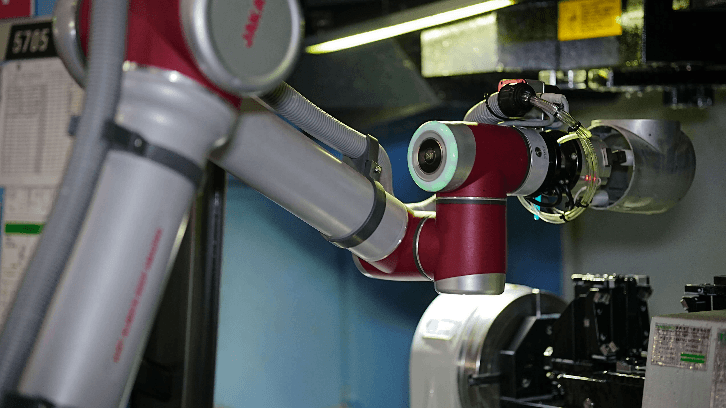
Step 1: Defining the Workspace and Safety Zones
Before any motion begins, the robot's digital environment must be configured. This involves setting up the "World" and "User" coordinate systems. For machine tending, it is vital to define the physical boundaries of the CNC machine and the parts tray. Modern systems allow you to set virtual safety walls and restricted zones, ensuring that the handling robot never interferes with the operator or the machine’s internal components during a high-speed cycle.
Step 2: Teaching Waypoints and Path Planning
The "teaching" phase is where the robot learns the specific path from the parts bin to the machine chuck. Historically, this required typing thousands of lines of code. Today, however, the process of configuring a 6 axis robot arm is much simpler: operators use "Free-drive" mode, where they manually move the arm to the desired position. By clicking a button on a tablet, the robot saves that point. A standard tending cycle typically involves three key waypoints: the approach point (outside the machine), the loading point (placing the part), and the exit path.
Step 3: End-of-Arm Tooling (EOAT) Integration
The robot interacts with the machine through its grippers. Programming this requires setting "Digital Output" (DO) signals. When the robot reaches the loading point, it sends a signal to open the gripper, wait for a confirmation signal from the machine's door or chuck, and then retract. Ensuring these I/O handshakes are precise prevents "dry runs" and potential collisions.
Step 4: Logic Loops and Error Handling
Finally, the program is wrapped in a logic loop. This ensures the robot repeats the cycle until the parts tray is empty. Crucially, error-handling routines must be added—for example, "If the gripper misses a part, stop and alert the operator." This level of intelligence allows the system to run "lights-out" for hours without constant supervision.
Precision Tending with JAKA Zu Series
At JAKA, we have revolutionized the machine tending workflow with our JAKA Zu series. Our JAKA Zu12, featuring a 12kg payload and a reach of 1327mm, is the ideal handling robot for managing heavy metal parts or tending multiple machines simultaneously. We have replaced the bulky teach pendant with the wireless JAKA App, allowing you to program your 6 axis robot arm directly from a tablet or smartphone.
Efficiency is at our core. At JAKA, our graphical programming interface means you can deploy a machine tending station in minutes rather than days. The JAKA Zu12 offers ±0.03mm repeatability, ensuring that every part is seated perfectly in the CNC chuck every time. By choosing our "Embodied Intelligence" solutions, you gain a partner that provides the speed of an industrial machine with the simplicity of a consumer device. Whether you are scaling a small machine shop or managing a global production line, JAKA provides the tools to automate with confidence.
'%3e%3cpath%20id='路径_17618'%20data-name='路径%2017618'%20d='M10.031,8,6,11.455l4.031,4.031'%20fill='none'%20stroke='%23333'%20stroke-linecap='round'%20stroke-linejoin='round'%20stroke-width='2'/%3e%3cpath%20id='路径_17619'%20data-name='路径%2017619'%20d='M6,14H19.24a7.486,7.486,0,1,1,0,14.971H9.454'%20transform='translate(0%20-2.545)'%20fill='none'%20stroke='%23333'%20stroke-linecap='round'%20stroke-linejoin='round'%20stroke-width='2'/%3e%3c/g%3e%3c/svg%3e)
'%3e%3cpath%20id='路径_17618'%20data-name='路径%2017618'%20d='M10.031,8,6,11.455l4.031,4.031'%20fill='none'%20stroke='%23fff'%20stroke-linecap='round'%20stroke-linejoin='round'%20stroke-width='2'/%3e%3cpath%20id='路径_17619'%20data-name='路径%2017619'%20d='M6,14H19.24a7.486,7.486,0,1,1,0,14.971H9.454'%20transform='translate(0%20-2.545)'%20fill='none'%20stroke='%23fff'%20stroke-linecap='round'%20stroke-linejoin='round'%20stroke-width='2'/%3e%3c/g%3e%3c/svg%3e) Return to List
Return to List


Germany: Breslauer Str. 10, 90766 Fuerth, Germany
Japan:1F, 1 - 6 - 14 Aoi, Higashi, Nagoya , Japan
Malaysia:5-G, Jalan Borealis 3, Bandar Cassia,14110 Simpang Ampat, Penang,Malaysia
China:18 Nangu Road, Minhang District, Shanghai, China
'%3e%3ccircle%20id='椭圆_7060'%20data-name='椭圆%207060'%20cx='50'%20cy='50'%20r='50'%20transform='translate(134%209657)'%20fill='%23d80c1e'/%3e%3cpath%20id='路径_21623'%20data-name='路径%2021623'%20d='M947.11,3321.132s-4.227,8.162,4.833,24.7c.065.116.129.23.195.346s.124.234.187.354c9.06,16.532,18.214,17.362,18.214,17.362a4.8,4.8,0,0,0,2.246-.177,17.018,17.018,0,0,0,4.229-2.687c1.79-1.639.384-5.317-.541-7.009-1.876-3.422-4.162-4.65-5.447-4.225-.577.188-3.1,1.7-3.1,1.7a2.855,2.855,0,0,1-1.86.213s-3.357-.941-7.792-8.892c-4.309-8.01-3.3-11.347-3.3-11.347a2.854,2.854,0,0,1,1.182-1.455s3.069-1.675,3.1-1.7c1.229-.863.555-4.1-.63-6.864a6.434,6.434,0,0,0-3.163-3.754c-2.256-1.158-7.477.768-8.349,3.436Z'%20transform='translate(-778%206368.353)'%20fill='%23fff'/%3e%3c/g%3e%3c/svg%3e)
Germany: Breslauer Str. 10, 90766 Fuerth, Germany
Japan:1F, 1 - 6 - 14 Aoi, Higashi, Nagoya , Japan
Malaysia:5-G, Jalan Borealis 3, Bandar Cassia,14110 Simpang Ampat, Penang,Malaysia
China:18 Nangu Road, Minhang District, Shanghai, China


'%3e%3cpath%20id='路径_21594'%20data-name='路径%2021594'%20d='M-993.748,3818.961h0a8.127,8.127,0,1,0-16.25,0'%20transform='translate(-0.958%200)'%20fill='none'%20stroke='%23d80c1e'%20stroke-linecap='round'%20stroke-linejoin='round'%20stroke-width='1'/%3e%3cpath%20id='路径_21595'%20data-name='路径%2021595'%20d='M-987.315,3834.607h0a6.421,6.421,0,0,1-6.421,6.421h-.153'%20transform='translate(-7.391%20-9.576)'%20fill='none'%20stroke='%23d80c1e'%20stroke-linecap='round'%20stroke-linejoin='round'%20stroke-width='1'/%3e%3crect%20id='矩形_48952'%20data-name='矩形%2048952'%20width='2.883'%20height='6.026'%20rx='1.442'%20transform='translate(-996.148%203818.961)'%20fill='none'%20stroke='%23d80c1e'%20stroke-linecap='round'%20stroke-linejoin='round'%20stroke-width='1'/%3e%3crect%20id='矩形_48953'%20data-name='矩形%2048953'%20width='2.883'%20height='6.026'%20rx='1.442'%20transform='translate(-1012.397%203818.961)'%20fill='none'%20stroke='%23d80c1e'%20stroke-linecap='round'%20stroke-linejoin='round'%20stroke-width='1'/%3e%3crect%20id='矩形_48954'%20data-name='矩形%2048954'%20width='3.07'%20height='2.291'%20rx='1.146'%20transform='translate(-1004.35%203830.306)'%20fill='none'%20stroke='%23d80c1e'%20stroke-linecap='round'%20stroke-linejoin='round'%20stroke-width='1'/%3e%3c/g%3e%3c/svg%3e)
'%3e%3cpath%20id='路径_21594'%20data-name='路径%2021594'%20d='M-993.748,3818.961h0a8.127,8.127,0,1,0-16.25,0'%20transform='translate(-0.958%200)'%20fill='none'%20stroke='%23fff'%20stroke-linecap='round'%20stroke-linejoin='round'%20stroke-width='1'/%3e%3cpath%20id='路径_21595'%20data-name='路径%2021595'%20d='M-987.315,3834.607h0a6.421,6.421,0,0,1-6.421,6.421h-.153'%20transform='translate(-7.391%20-9.576)'%20fill='none'%20stroke='%23fff'%20stroke-linecap='round'%20stroke-linejoin='round'%20stroke-width='1'/%3e%3crect%20id='矩形_48952'%20data-name='矩形%2048952'%20width='2.883'%20height='6.026'%20rx='1.442'%20transform='translate(-996.148%203818.961)'%20fill='none'%20stroke='%23fff'%20stroke-linecap='round'%20stroke-linejoin='round'%20stroke-width='1'/%3e%3crect%20id='矩形_48953'%20data-name='矩形%2048953'%20width='2.883'%20height='6.026'%20rx='1.442'%20transform='translate(-1012.397%203818.961)'%20fill='none'%20stroke='%23fff'%20stroke-linecap='round'%20stroke-linejoin='round'%20stroke-width='1'/%3e%3crect%20id='矩形_48954'%20data-name='矩形%2048954'%20width='3.07'%20height='2.291'%20rx='1.146'%20transform='translate(-1004.35%203830.306)'%20fill='none'%20stroke='%23fff'%20stroke-linecap='round'%20stroke-linejoin='round'%20stroke-width='1'/%3e%3c/g%3e%3c/svg%3e)


'%3e%3cpath%20id='路径_21593'%20data-name='路径%2021593'%20d='M-971.813,3958.813l5.517-5.517,5.517,5.517'%20fill='none'%20stroke='%23d80c1e'%20stroke-linecap='round'%20stroke-linejoin='round'%20stroke-width='1'/%3e%3cline%20id='直线_13976'%20data-name='直线%2013976'%20y2='15.981'%20transform='translate(-966.296%203953.296)'%20fill='none'%20stroke='%23d80c1e'%20stroke-linecap='round'%20stroke-linejoin='round'%20stroke-width='1'/%3e%3cline%20id='直线_13977'%20data-name='直线%2013977'%20x2='8.519'%20transform='translate(-970.556%203952.778)'%20fill='none'%20stroke='%23d80c1e'%20stroke-linecap='round'%20stroke-linejoin='round'%20stroke-width='1'/%3e%3c/g%3e%3c/svg%3e)
'%3e%3cpath%20id='路径_21593'%20data-name='路径%2021593'%20d='M-971.813,3958.813l5.517-5.517,5.517,5.517'%20fill='none'%20stroke='%23fff'%20stroke-linecap='round'%20stroke-linejoin='round'%20stroke-width='1'/%3e%3cline%20id='直线_13976'%20data-name='直线%2013976'%20y2='15.981'%20transform='translate(-966.296%203953.296)'%20fill='none'%20stroke='%23fff'%20stroke-linecap='round'%20stroke-linejoin='round'%20stroke-width='1'/%3e%3cline%20id='直线_13977'%20data-name='直线%2013977'%20x2='8.519'%20transform='translate(-970.556%203952.778)'%20fill='none'%20stroke='%23fff'%20stroke-linecap='round'%20stroke-linejoin='round'%20stroke-width='1'/%3e%3c/g%3e%3c/svg%3e)