



'%3e%3cline%20id='直线_13422'%20data-name='直线%2013422'%20x2='29.367'%20transform='translate(23668.262%20-12026.238)%20rotate(45)'%20fill='none'%20stroke='%23000'%20stroke-linecap='round'%20stroke-width='2'/%3e%3cline%20id='直线_13423'%20data-name='直线%2013423'%20x2='29.367'%20transform='translate(23689.027%20-12026.238)%20rotate(135)'%20fill='none'%20stroke='%23000'%20stroke-linecap='round'%20stroke-width='2'/%3e%3c/g%3e%3c/svg%3e)
'%3e%3cpath%20id='路径_21753'%20data-name='路径%2021753'%20d='M25.248,22.5A8.248,8.248,0,1,0,17,14.248,8.248,8.248,0,0,0,25.248,22.5Z'%20transform='translate(-0.33%20-1.695)'%20fill='none'%20stroke='%23000'%20stroke-linecap='round'%20stroke-linejoin='round'%20stroke-width='4'/%3e%3cpath%20id='路径_21754'%20data-name='路径%2021754'%20d='M6,41.453v1.261H43.837V41.453c0-4.709,0-7.064-.916-8.862a8.409,8.409,0,0,0-3.675-3.675C37.448,28,35.093,28,30.384,28H19.453c-4.709,0-7.064,0-8.862.916a8.408,8.408,0,0,0-3.675,3.675C6,34.39,6,36.744,6,41.453Z'%20transform='translate(0%201.209)'%20fill='none'%20stroke='%23000'%20stroke-linecap='round'%20stroke-linejoin='round'%20stroke-width='4'/%3e%3c/g%3e%3c/svg%3e)


'%3e%3cpath%20id='路径_20744'%20data-name='路径%2020744'%20d='M5,19H22.665v9.762a.93.93,0,0,1-.93.93H5.93a.93.93,0,0,1-.93-.93Z'%20transform='translate(0%20-8.027)'%20fill='none'%20stroke='%23999'%20stroke-linejoin='round'%20stroke-width='1.5'/%3e%3cpath%20id='路径_20745'%20data-name='路径%2020745'%20d='M5,7.93A.93.93,0,0,1,5.93,7H21.735a.93.93,0,0,1,.93.93v4.649H5Z'%20transform='translate(0%20-1.605)'%20fill='none'%20stroke='%23999'%20stroke-linejoin='round'%20stroke-width='1.5'/%3e%3cpath%20id='路径_20746'%20data-name='路径%2020746'%20d='M16,4V7.719'%20transform='translate(-5.886)'%20fill='none'%20stroke='%23999'%20stroke-linecap='round'%20stroke-linejoin='round'%20stroke-width='1.5'/%3e%3cpath%20id='路径_20747'%20data-name='路径%2020747'%20d='M32,4V7.719'%20transform='translate(-14.449)'%20fill='none'%20stroke='%23999'%20stroke-linecap='round'%20stroke-linejoin='round'%20stroke-width='1.5'/%3e%3cpath%20id='路径_20748'%20data-name='路径%2020748'%20d='M28,34h2.789'%20transform='translate(-12.308%20-16.054)'%20fill='none'%20stroke='%23999'%20stroke-linecap='round'%20stroke-linejoin='round'%20stroke-width='1.5'/%3e%3cpath%20id='路径_20749'%20data-name='路径%2020749'%20d='M14,34h2.789'%20transform='translate(-4.816%20-16.054)'%20fill='none'%20stroke='%23999'%20stroke-linecap='round'%20stroke-linejoin='round'%20stroke-width='1.5'/%3e%3cpath%20id='路径_20750'%20data-name='路径%2020750'%20d='M28,26h2.789'%20transform='translate(-12.308%20-11.773)'%20fill='none'%20stroke='%23999'%20stroke-linecap='round'%20stroke-linejoin='round'%20stroke-width='1.5'/%3e%3cpath%20id='路径_20751'%20data-name='路径%2020751'%20d='M14,26h2.789'%20transform='translate(-4.816%20-11.773)'%20fill='none'%20stroke='%23999'%20stroke-linecap='round'%20stroke-linejoin='round'%20stroke-width='1.5'/%3e%3c/g%3e%3c/svg%3e) 2026.08.11 News
2026.08.11 News


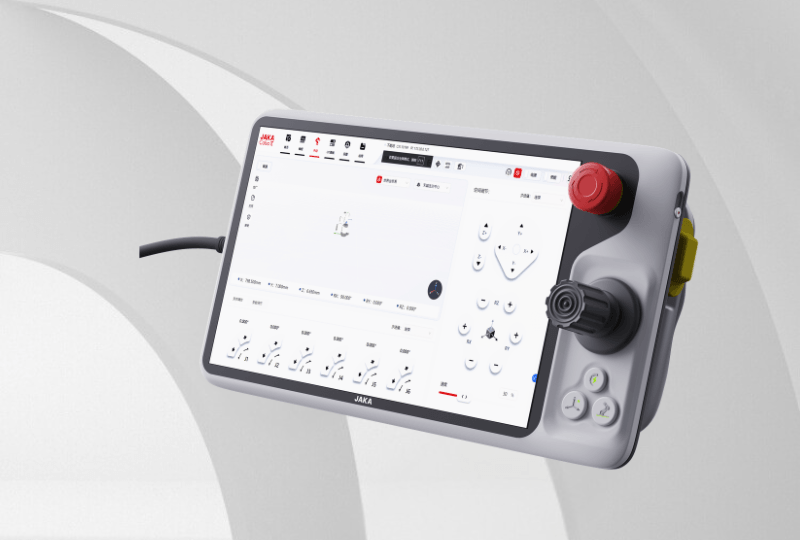
The JAKA Touch II is the next-generation teach pendant for JAKA collaborative robots, building on the proven Touch I with a more integrated and purpose-built design for professional robot operation. A larger display, dedicated physical controls and built-in safety features make the JAKA Touch II a practical tool for teaching, setup and everyday cobot operation.
When working with a collaborative robot, the teach pendant is one of the main interfaces between the operator and the robot. It needs to make programming and setup intuitive, while also providing the physical controls and safety functions needed for working directly with the robot.
The JAKA Touch II has been designed specifically for this purpose. While its large touchscreen may look familiar to anyone who has used a tablet, the Touch II is built as a professional teach pendant for industrial automation — combining touchscreen interaction with dedicated physical controls, safety features and a robust industrial design.
A large screen for a clearer view
The Touch II features a 30.7 cm LCD display with a 2000 × 1200 resolution, giving operators more space to view robot information and interact with the control interface. The capacitive multi-touch screen also supports intuitive touchscreen operation, including the kind of drag-and-drop interaction operators are already familiar with.
The larger display is particularly useful during teaching and setup, where having a clear view of the robot and its parameters can make programming and adjustments more straightforward.
Direct connection to the robot
Unlike a standard tablet that would typically rely on Wi-Fi to communicate with a robot, the Touch II is connected directly to the robot controller via cable.
This wired connection provides a stable and reliable link between the operator and the robot, without relying on a wireless network. That can be particularly important in industrial environments where reliable communication is essential.
The Touch II comes with a 6-metre cable, giving operators room to work around the robot while remaining directly connected to the controller.
Physical controls for precise robot teaching
A touchscreen alone is not always the most practical way to control a robot during teaching.
That is why the Touch II combines its touchscreen interface with dedicated physical controls, including a three-axis joystick, six programmable membrane buttons, an emergency stop button and a three-position enabling button.
The joystick provides a natural way to move and position the robot during teaching and setup. Instead of relying entirely on on-screen controls, operators can use a dedicated physical control to make precise adjustments while working with the robot.
The programmable buttons provide additional flexibility, allowing frequently used functions to be accessed directly from the pendant.
Safety built into the design
Safety is an essential part of any device used to operate an industrial robot. The Touch II therefore incorporates several dedicated safety features directly into the hardware.
An integrated emergency stop button allows the operator to stop the robot when necessary.
The pendant also includes a three-position enabling switch, sometimes referred to as a deadman switch. It is designed so that manual robot movement requires the operator to intentionally hold the switch in the appropriate position, providing an additional layer of protection during manual operation and teaching.
Together, these features make the Touch II more than simply a touchscreen interface — they provide the physical controls needed for direct and controlled interaction with the robot.
Built for everyday industrial use
The Touch II has been designed to withstand the conditions of an industrial working environment.
Its enclosure has an IP65 protection rating, while the pendant is designed to withstand drops from heights of up to 1.2 metres.
The housing combines ABS+PC and aluminium, and the pendant weighs approximately 1.2 kg excluding the cable. It is designed to operate across a temperature range of -20°C to 60°C, making it suitable for a wide range of working environments.
These details may not be as visible as the touchscreen or joystick, but they are important when a teach pendant is being used regularly on the factory floor.
More than just a robot controller
Although the Touch II is designed specifically for robot operation, its touchscreen interface also provides flexibility for applications where operators need to interact with other equipment.
The Touch II can display additional HMI interfaces, allowing relevant external equipment to be monitored or controlled from the same device when required. This can help reduce the need for separate operator interfaces in certain automation applications.
The result is a teach pendant that combines the familiarity of a modern touchscreen with the physical controls, safety functions and durability expected from industrial equipment.
A practical interface for collaborative robot operation
The JAKA Touch II brings together the features operators need when teaching and setting up a collaborative robot: a large touchscreen, direct wired communication, a dedicated joystick, programmable physical buttons, emergency stop and three-position enabling switch.
Combined with its IP65 protection, 1.2-metre drop resistance and robust construction, it is designed to be used as part of everyday industrial automation rather than simply looking like a tablet.
The JAKA Touch II puts intuitive touchscreen interaction and professional robot controls together in one purpose-built teach pendant — making robot teaching, setup and operation more straightforward, precise and reliable.
'%3e%3cpath%20id='路径_17618'%20data-name='路径%2017618'%20d='M10.031,8,6,11.455l4.031,4.031'%20fill='none'%20stroke='%23333'%20stroke-linecap='round'%20stroke-linejoin='round'%20stroke-width='2'/%3e%3cpath%20id='路径_17619'%20data-name='路径%2017619'%20d='M6,14H19.24a7.486,7.486,0,1,1,0,14.971H9.454'%20transform='translate(0%20-2.545)'%20fill='none'%20stroke='%23333'%20stroke-linecap='round'%20stroke-linejoin='round'%20stroke-width='2'/%3e%3c/g%3e%3c/svg%3e)
'%3e%3cpath%20id='路径_17618'%20data-name='路径%2017618'%20d='M10.031,8,6,11.455l4.031,4.031'%20fill='none'%20stroke='%23fff'%20stroke-linecap='round'%20stroke-linejoin='round'%20stroke-width='2'/%3e%3cpath%20id='路径_17619'%20data-name='路径%2017619'%20d='M6,14H19.24a7.486,7.486,0,1,1,0,14.971H9.454'%20transform='translate(0%20-2.545)'%20fill='none'%20stroke='%23fff'%20stroke-linecap='round'%20stroke-linejoin='round'%20stroke-width='2'/%3e%3c/g%3e%3c/svg%3e) Return to List
Return to List


90766 Fuerth, Germany
'%3e%3ccircle%20id='椭圆_7060'%20data-name='椭圆%207060'%20cx='50'%20cy='50'%20r='50'%20transform='translate(134%209657)'%20fill='%23d80c1e'/%3e%3cpath%20id='路径_21623'%20data-name='路径%2021623'%20d='M947.11,3321.132s-4.227,8.162,4.833,24.7c.065.116.129.23.195.346s.124.234.187.354c9.06,16.532,18.214,17.362,18.214,17.362a4.8,4.8,0,0,0,2.246-.177,17.018,17.018,0,0,0,4.229-2.687c1.79-1.639.384-5.317-.541-7.009-1.876-3.422-4.162-4.65-5.447-4.225-.577.188-3.1,1.7-3.1,1.7a2.855,2.855,0,0,1-1.86.213s-3.357-.941-7.792-8.892c-4.309-8.01-3.3-11.347-3.3-11.347a2.854,2.854,0,0,1,1.182-1.455s3.069-1.675,3.1-1.7c1.229-.863.555-4.1-.63-6.864a6.434,6.434,0,0,0-3.163-3.754c-2.256-1.158-7.477.768-8.349,3.436Z'%20transform='translate(-778%206368.353)'%20fill='%23fff'/%3e%3c/g%3e%3c/svg%3e)
90766 Fuerth, Germany


'%3e%3cpath%20id='路径_21593'%20data-name='路径%2021593'%20d='M-971.813,3958.813l5.517-5.517,5.517,5.517'%20fill='none'%20stroke='%23d80c1e'%20stroke-linecap='round'%20stroke-linejoin='round'%20stroke-width='1'/%3e%3cline%20id='直线_13976'%20data-name='直线%2013976'%20y2='15.981'%20transform='translate(-966.296%203953.296)'%20fill='none'%20stroke='%23d80c1e'%20stroke-linecap='round'%20stroke-linejoin='round'%20stroke-width='1'/%3e%3cline%20id='直线_13977'%20data-name='直线%2013977'%20x2='8.519'%20transform='translate(-970.556%203952.778)'%20fill='none'%20stroke='%23d80c1e'%20stroke-linecap='round'%20stroke-linejoin='round'%20stroke-width='1'/%3e%3c/g%3e%3c/svg%3e)
'%3e%3cpath%20id='路径_21593'%20data-name='路径%2021593'%20d='M-971.813,3958.813l5.517-5.517,5.517,5.517'%20fill='none'%20stroke='%23fff'%20stroke-linecap='round'%20stroke-linejoin='round'%20stroke-width='1'/%3e%3cline%20id='直线_13976'%20data-name='直线%2013976'%20y2='15.981'%20transform='translate(-966.296%203953.296)'%20fill='none'%20stroke='%23fff'%20stroke-linecap='round'%20stroke-linejoin='round'%20stroke-width='1'/%3e%3cline%20id='直线_13977'%20data-name='直线%2013977'%20x2='8.519'%20transform='translate(-970.556%203952.778)'%20fill='none'%20stroke='%23fff'%20stroke-linecap='round'%20stroke-linejoin='round'%20stroke-width='1'/%3e%3c/g%3e%3c/svg%3e)